
Smart TVs are everywhere! But who is the master?
Amid the overall electronics boom thanks to A.I., one piece of electronics is almost unchanged financially. That is the digital display or flat-panel monitor. With good reason! The entire entertainment and streaming industry wants one of these devices in your living room. Not only wanting access to your wallet; companies are willing to violate customer trust to squeeze a few extra pennies out of the devices they sold you. To these companies, you technically never really owned the device, but instead purchased permission from these companies to have it exist in your household. Like a true tech-valley rapist, they will break into your home, listen to everything you do via the microphone, track every movement that you make thanks to their backdoored OS, and most importantly, spread malware onto devices they don't even own.
Whoah S! Mal-ware? Isn't that a little harsh? - Anonymous
Malware, by definition, is software you never asked for and was installed without your permission. At least in LG's case. Using Legal Ninjitsu to state that by agreeing to install their monitor 'driver,' you also agree to install every other bloatware application that they choose should come with it as well. Like advertising, it takes a shit all over your desktop to churn profits for LG.
Read on to continue the descent into madness.
It all starts with going cheap.
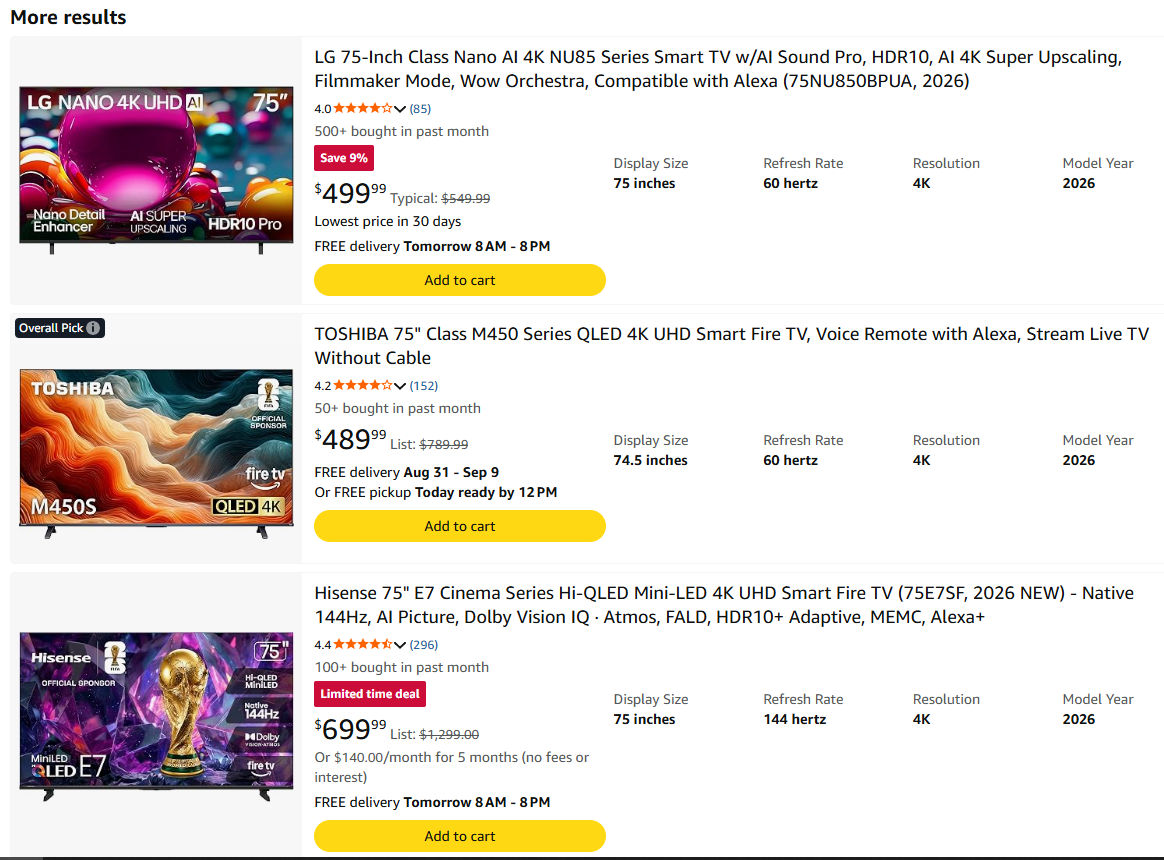
It didn't take a whole lot of searching on Amazon to find what appears to be a good deal on a 75-inch TV. We figured we'd go with 75 inches because, like every American household, it's a good idea to go big when purchasing a TV for your bathroom. Ahh, nothing like being on the shitter while catching eye strain from the TV that practically covers an entire side of the wall.
Sure enough, LG comes out on top with their (bullshit) AI upscaling and "Wow Orchestra," whatever that means. But $10 more than the Toshiba... WHY NOT RIGHT?!?
So you get this bad-boy home, hook it up to your laptop with Windows 11 so you can get Netflix going on..
Oh, there's a driver update for the LG television. Makes sense, right? It's a fairly recent television, and the drivers will help us take advantage of all of the TV's features. Of course, I'd like Microsoft to download it.
LG Malware:
Then after a while, you notice more and more applications appear on your desktop. Like a copy of McAfee antivirus that you never asked for. Now, if this were an elderly couple or someone who doesn't know anything about computers. They wouldn't even know their system is being turned against them by LG. Some would think their system was hacked by someone else. But actually, no. Because Microsoft is being ambivalent by letting LG's supposed 'driver' install itself and, via LG's proxy, install even more applications.
How does this attack work? Especially when you made SURE LG has no access to the internet!
This all happens the moment you plug that HDMI (or DisplayPort for people who purchased an LG computer monitor) right into an internet-enabled laptop through a protocol called EDID, also known as "Extended Display Identification Data," which by itself is totally harmless!
It simply tells your operating system what kind of monitor is connected, what its capabilities are, it's serial number. That's it!
Inside Windows, when you go to Device Manager, it might not seem like much. Just a generic UPNP device attached as a monitor.
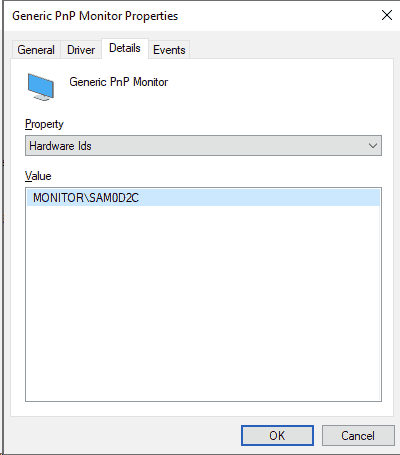
Dive a little more into Device Manager, and we see where EDID does its magic; we found that this particular Microsoft Box is hooked up to some kind of Samsung monitor. Now, Samsung might have some kind of driver that would help take advantage of my monitor. But this Samsung is so old they simply do not care.
When your core OS, like Microslop has been compromised by an incredibly wealthy organization such as LG. Having your Windows Updater schedule a driver release seems like a helpful thing to do for your end users. And it helps if LG throws a lot of money Microsoft's way as a partner to look the other way, as their supposed driver software has its way with your laptop. Well! What's the matter with that? Don't you want "Value added features?" or you can't be possibly stupid to uninstall a virus checker as "Reputable" as McAfee right?
Hah! I don't have to worry about this! I got Linux!
For now.. That's true. But EDID transmission still happens. and your can install ddcutil to check it out.
crackhead@BLORB.LOCALHOST:~$ ddcutil detect
I2C bus: /dev/i2c-2
DRM_connector: card1-HDMI-A-2
EDID synopsis:
Mfg id: APX - AP Designs Ltd
Model: LE24H87
Product code: 12852 (0x3234)
Serial number:
Binary serial number: 535 (0x00000217)
Manufacture year: 2010, Week: 32
This monitor does not support DDC/CI. (I2C slave address x37 is unresponsive.)
For the sake of this blog, we powered up one of our thin clients and connected HDMI to it. It shows a lot of information for my ultra-crap monitor that was made in 2010.
But what stops LG from convincing the Ubuntu maintainers to make an LG variant of their supposed driver to magically appear in your snap or apt package repository? You hope to God they don't, but the danger is always there.
Fuck, i'll just not get an LG TV Then!
If you're going to be home all of the time, that's a perfectly acceptable solution. Keep in mind LG may be the first company that is eager to erode trust to get a few extra dollars or listen in on your conversations. Corporations are cowards; if they see one person exploiting people, you'll bet your ass the rest will follow right in line. Eventually, Smart TVs will be used against you. On top of this, getting a "Non-SMART TV," you'll quickly find out that most of those only exist within commercial environments; often, they want a premium price for not having an Android OS that could get hacked, or plaster movie ads the moment you power it up.
For example, if you checked into one of the many newly renovated Hilton hotels throughout the United States while traveling. It's almost guaranteed to have an LG TV not only powered on the moment you enter the room but connected to the hotel internet, ready to spy away on you.
Usually, you can just unplug the damn TV and watch movies on your laptop screen. OR! You do something about it.
Enter the EDID Blocker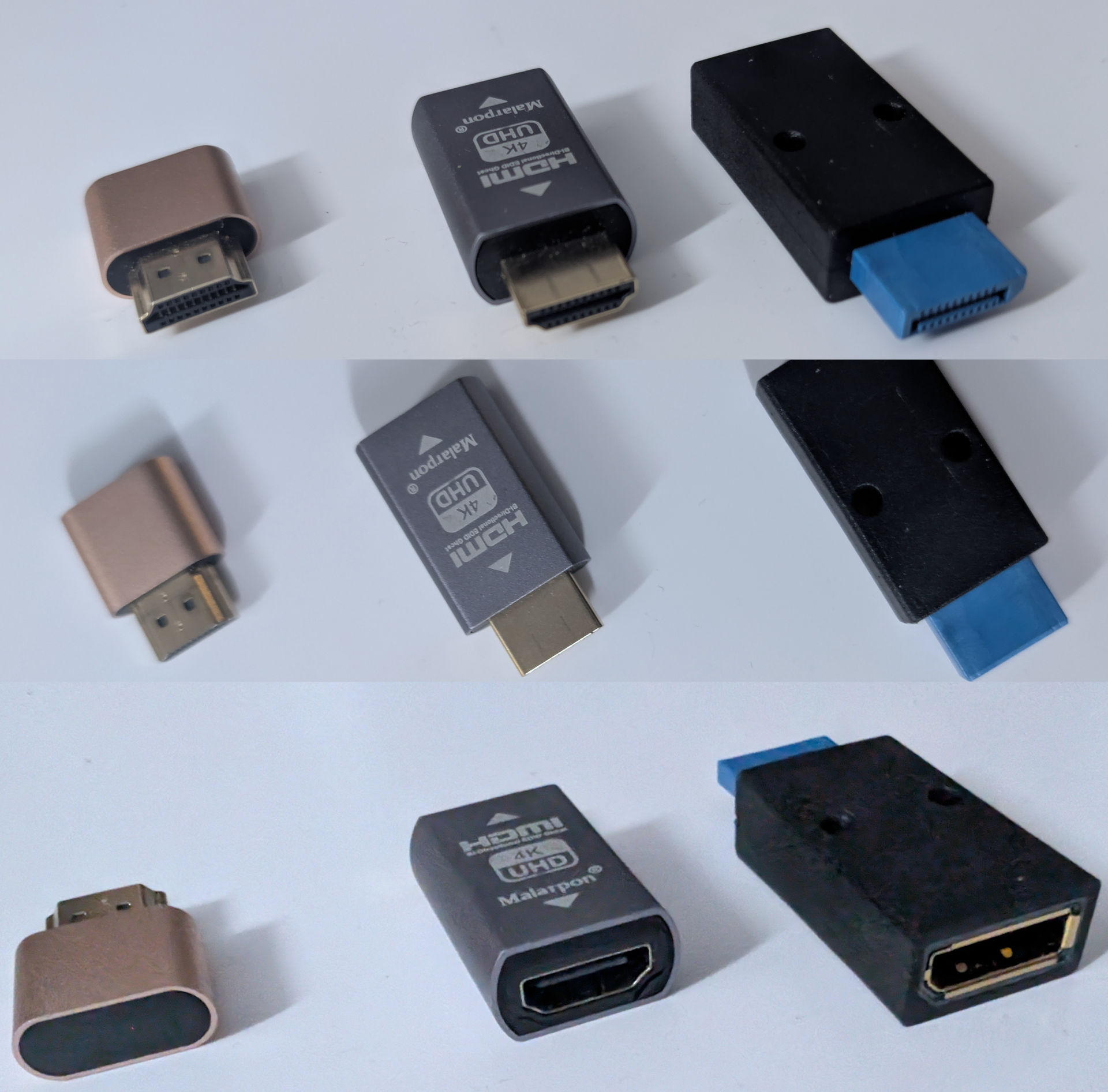
We've used each one of these units during one part of our lifetime in the world of computers.
- The gold one on the left is actually an EDID dummy plug. It allows a computer to be powered on, thinking there is an HDMI monitor attached to its workstation, when in reality there is none. Useful if you like graphical remote desktops and don't want the resolution to get all stupid the moment you unplug.
- The other is a common HDMI EDID blocker. There's a lot out there with varying quality. Originally, these were used in conjunction with an HDMI splitter so if the monitors change it doesn't black out the display. Another use is if you have a lot of projectors in a particular orientation and don't want windows to completely screw up your tiling without using Nvidia Mosaic, this is more of a hardware-based approach.
crackhead@BLORB.LOCALHOST:~$ ddcutil detect
I2C bus: /dev/i2c-2
DRM_connector: card1-HDMI-A-2
EDID synopsis:
Mfg id: XMD - UNK
Model: Mi TV
Product code: 154 (0x009a)
Serial number:
Binary serial number: 0 (0x00000000)
Manufacture year: 2017, Week: 39
This monitor does not support DDC/CI. (I2C slave address x37 is unresponsive.)
TV changed, and if I unplug just the HDMI cable going to my 2010 television, it'll still read just fine.
- You're probably wondering about the last EDID blocker, which is DisplayPort to DisplayPort. WELL!
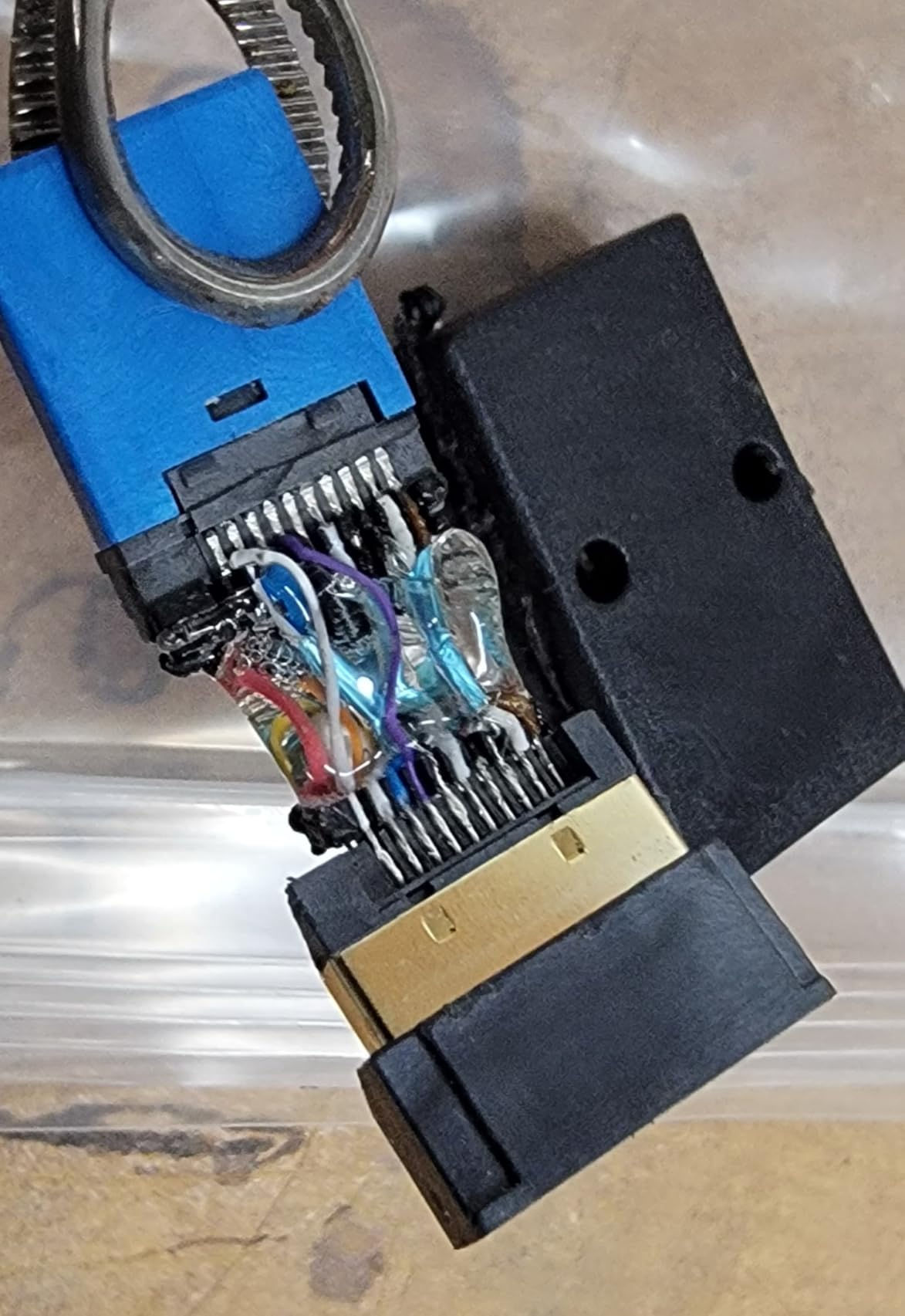
It's a scam. Just a bunch of wires, shit-soldered together to make a jumper and charger 15-30-45 to pass it off as an actual blocker. We wanted to get a legit EDID blocker to show you its device. But it's important to document even the bootleg garbage you get when working with grey-market tech. Got my refund right away on this one.
This, however, illustrates the importance of checking your hardware when you get it. If we got an LG gaming monitor with this bootleg piece of shit hooked up to a Windows box. Welp! We would probably be scrubbing McAfee off of our computers AGAIN!
When it comes to a DisplayPort EDID emulator, there are legit companies out there. But they're pricey. Anywhere from $50 to $150 US Dollars.
Final thoughts.
There are, of course, more sensible techniques to fight corrupt smart TVs, such as the following:
- Never give ANY smart device internet.
- Have a good firewall that Microsoft never touched. Especially make sure your DNS for these companies is diverted to a picture of Obama. Generally, a good open-source router with ad-blocking plugins will take care of this
- Just change your OS. Worked for me!
- Use a Linux-based OS to watch TV. Don't get another Android box loaded with spyware.
- Throw it into the garbage and financially eat shit buying a TV with no OS whatsoever. Or a better and more portable solution could be a projector instead.
- You know what? There's really nothing good to watch on TV anyways. If Hollywood has to subsidize the television industry just to keep its base, it doesn't have any money to invest in anything new. Every channel just wants to brainwash you. So throwing the Flat Panel into the garbage might be a good idea anyways.
But if you're backed into a corner with your work laptop running Microslop and everyone is insisting on hooking your carbomb of a laptop up to the world's most malware-infested TVs, such as an LG. It's good to know there are hardware options to protect yourself by misdirecting the manufacturer label so no drivers can ever be detected or downloaded.
The only downside we've ever experienced with these blockers is when something is rated for 4K. Your system BIOS might automatically switch to 4K until the OS returns. Minor annoyance. But it's something worth noting.
That's what server said
END OF LINE+++